
How To Set Up Whonix Securely in 2025 (Maximum Tor OpSec)
A hardened, OpSec-first Whonix setup guide for serious Tor and darknet users in 2025.
 UnderDaug
 December 3, 2025
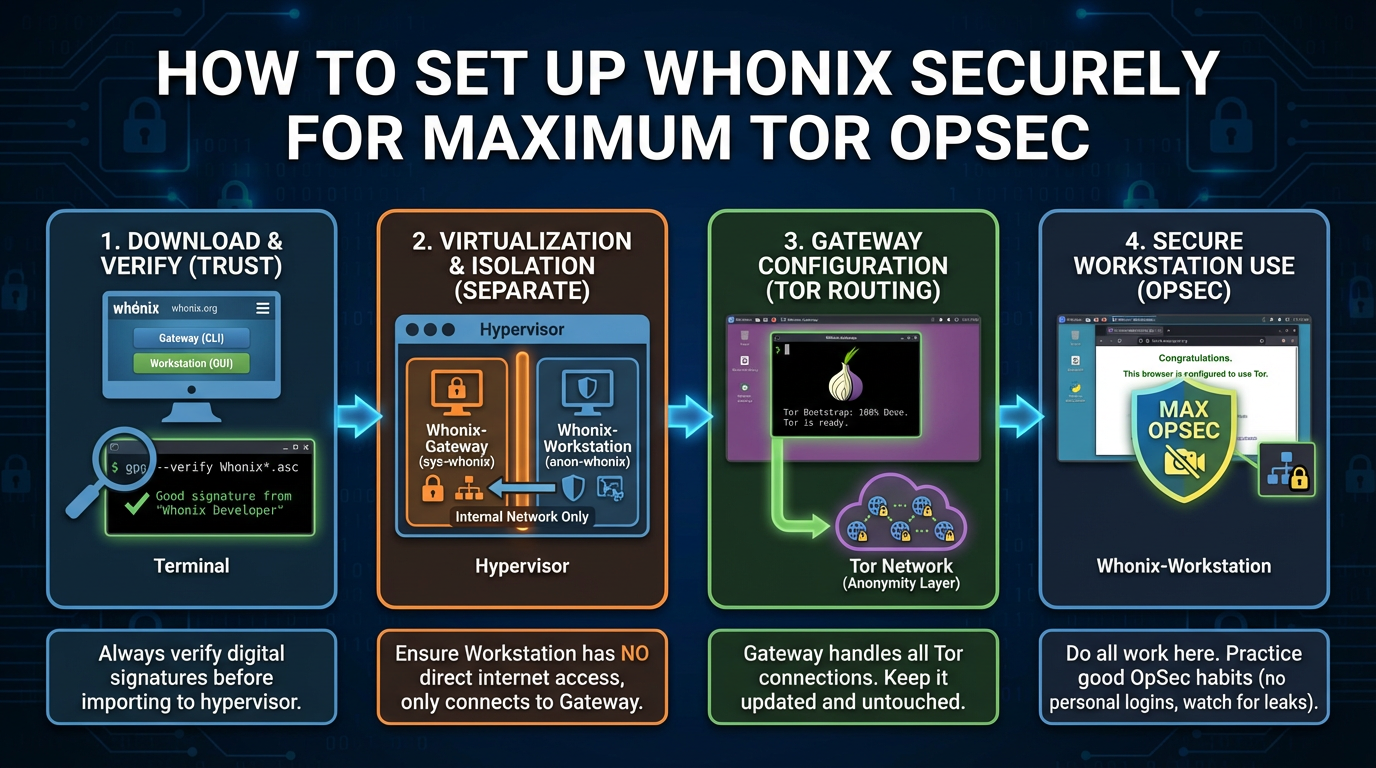
Whonix is one of the most secure ways to use Tor in 2025. Unlike Tor Browser alone, Whonix enforces system-wide Tor routing and strong isolation between your real system and your darknet activity.
This guide is written with a hostile threat model in mind. If you care about real operational security, follow every step carefully.
What Is Whonix?
Whonix is a security-focused operating system that runs inside virtual machines. It uses a two-VM architecture:
- Whonix-Gateway: Routes all traffic through Tor
- Whonix-Workstation: Isolated environment with no direct internet access
This design prevents IP leaks even if applications are misconfigured or compromised.
Who Should Use Whonix?
- Users who need stronger OpSec than Tor Browser alone
- Darknet researchers, journalists, and high-risk users
- Anyone who understands that anonymity failures are usually user mistakes
System Requirements (2025)
- Host OS: Linux or Windows (Linux preferred)
- RAM: 8 GB minimum (16 GB recommended)
- CPU: Virtualization support (Intel VT-x / AMD-V enabled)
- Disk Space: ~30 GB free
Step 1: Install VirtualBox (Official Source Only)
Whonix officially supports VirtualBox.
- Download VirtualBox from the official website
- Install using default settings
- Reboot your system after installation
Step 2: Download Whonix (Verify Before Use)
Only download Whonix from the official Whonix website.
- Download the Whonix for VirtualBox package
- Verify the signature or checksum if possible
Step 3: Import Whonix Virtual Machines
- Open VirtualBox
- Import the Whonix-Gateway appliance
- Import the Whonix-Workstation appliance
Do not modify network settings unless you fully understand the consequences.
Step 4: First Boot Order (Critical)
- Start Whonix-Gateway first
- Wait until Tor connects successfully
- Only then start Whonix-Workstation
Step 5: Initial Whonix Configuration
- Complete the first-run setup wizard
- Allow system updates to finish
- Confirm Tor connectivity inside the Workstation
Step 6: Tor Browser Usage Inside Whonix
- Use the preinstalled Tor Browser only
- Set Tor Browser security level to Safer or Safest
- Never install browser extensions
- Do not resize the browser window
Recommended Whonix OpSec Practices
- Use Whonix only for Tor-related activity
- Never log into personal accounts
- Keep Whonix and VirtualBox updated
- Use PGP for authentication and communication
- Snapshot VMs before risky activity
Whonix vs Tor Browser Alone
- Whonix prevents IP leaks by design
- Whonix isolates applications at the OS level
- Tor Browser alone relies more on user discipline
If your threat model includes serious adversaries, Whonix is the safer choice.
Final Thoughts
Whonix is not magic. It dramatically reduces risk, but only if you respect its design and maintain strict OpSec. Most failures still come from user behavior, not software.
Used correctly, Whonix remains one of the strongest Tor setups available in 2025.